Dev Log
Active development diary for Urban Sprawl
After the terrain refactor and the road/vehicle realism work, one piece of the city kept reading as cartoony from the isometric view: the buildings themselves. The first-person camera looked great because POM, interior mapping, full SSAO, and short-range detail systems were all active. But from above, every building was a flat-colored prism with a bright-cardboard top. We pulled the thread on why FPV looked so much better, then mapped that diagnosis onto a structured fix.
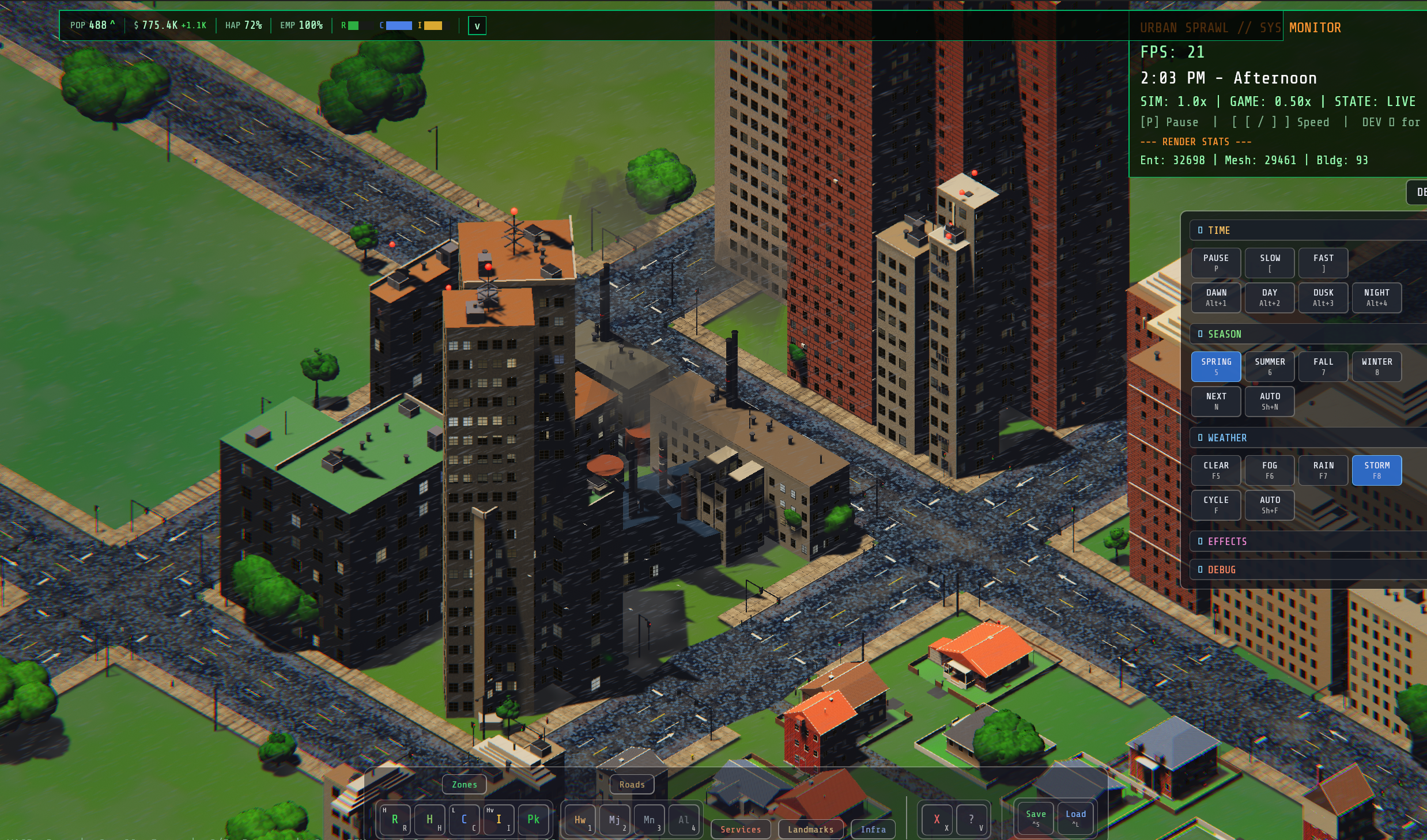
The Diagnosis
Three things were active in FPV but disabled in isometric:
- Parallax Occlusion Mapping — cuts off at 150m. Isometric camera lives at ~300m+ above the city, so POM never fires. Facades render as pure normal-mapped surfaces with zero depth parallax
- Detail systems — rooftop AC units, awnings, storefront glazing all spawn within ~250m. From an isometric viewpoint they're either culled or so tiny they vanish into pixel noise
- Window interior mapping — the raycast-into-virtual-room trick only works at grazing angles. From directly overhead, every window is a flat colored square
On top of that, the base look itself was stylized: 12-vertex cube meshes, saturated zone-coded colors (LEGO-blue commercial, terracotta residential), no per-building variation, no weathering. Every brick building looked exactly like every other brick building.
The Plan
Five tiers, ordered cheapest-first so each is independently shippable. The user picked all three plus a palette dirty-down, with a "weather it instead of changing the colors" preference (later upgraded to "actually do both"). Phase 1 was the shader-only pass.
Phase 1: Per-Instance Building Weathering
Single shader file (building_instanced.wgsl) plus a small palette tweak in
building_instances.rs. No new uniforms, no new bind groups, no new textures — just
a per-fragment math block that runs after texture sampling and before lighting.
- Per-instance hash seeded by
lot_index(already inextra.y) via PCG-style integer mix. Drives ±8% brightness jitter and a small warm/cool hue shift — two adjacent buildings drawn from the same palette entry now look measurably different - Vertical drip streaks on side walls only, two-octave sine pattern over horizontal world position, sharpened with smoothstep so they read as drips, not gradients. Phase varies per-building so no two facades stripe identically. Strength keyed by facade type: 0.18 multiplier on porous brick/concrete, 0.10 on glass/metal
- Top-edge water shadow — darker band right under the parapet, fades out below
- Roof darkening on top-facing surfaces (
world_normal.y > 0.85), darkening to ~50% with a procedural mottle and warm tar tint. The single biggest win for the isometric view — kills the bright-color-on-top effect that screamed "1990 graphics" - North-side grime — subtle ~7% darkening on walls facing -Z to imply moisture/algae buildup
Phase 2: Procedural RoofMaterial
Phase 1 was good, but the roof darkening fix exposed the real problem: the visible "roofs" weren't actually
the building bodies' top faces. They were roof cap entities — separate flat slabs spawned
by rooftop_details.rs with their own StandardMaterial. The Phase 1 building shader
never touched them. They were getting rendered with bright tan/cream StandardMaterial base colors
and lit head-on by the midday sun, looking like sheets of cardboard laid on top of every building.
The fix: a dedicated RoofMaterial = ExtendedMaterial<StandardMaterial, RoofExtension> with
a custom WGSL fragment shader, modeled on the existing asphalt material pattern.
roof.wgsl: tar/membrane base color (linear-space, dramatically darker than the previous palette) · per-instance brightness jitter · high-frequency gravel speckle · sparse pebble highlights · large weather stains (water shadow / soot / mildew) · sun-bleached patches · membrane seam lines every 3.5m in both axes · equipment scuff zones · industrial corrugation ribs (per-archetype) · wet response with Schlick Fresnel sky reflection and rain ripples · winter snow accumulation with drift variation and heat-loss melt zones around equipment.
The shader pulls live WeatherState wetness, rain intensity, and a season-derived snow factor
each frame via two sync systems. Sky reflection colors come from the same SkyReflectionColors
resource the asphalt material already uses, so wet roofs and wet roads pick up the same sky tint.
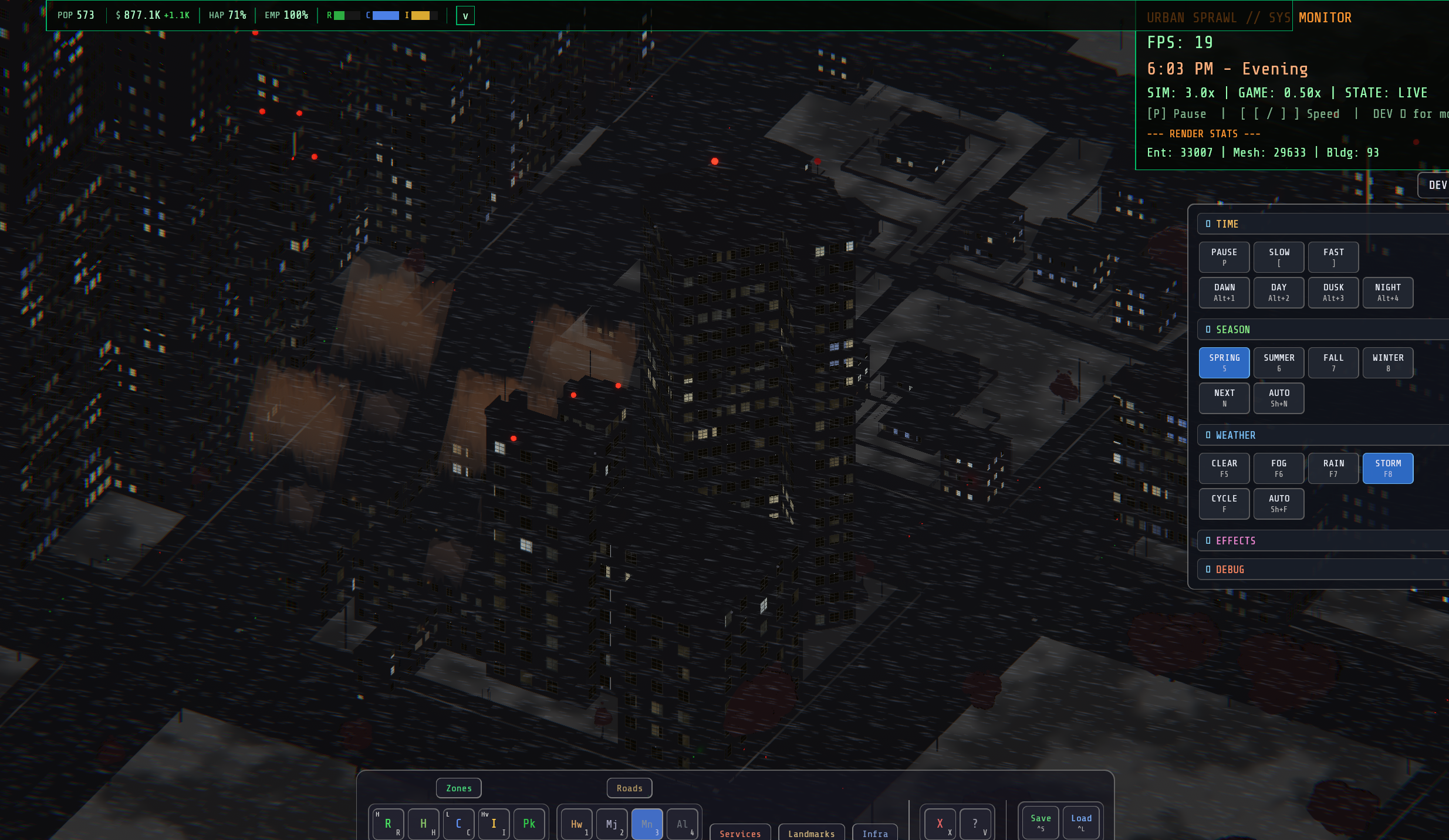
Coverage Expansion (The Fun Part)
Once RoofMaterial was working, the next round of testing immediately exposed three deeper bugs.
The user sent screenshots showing rowhouses, low-density commercial, industrial, and high-density commercial
towers all still looking flat. Different reasons in each case:
- Rowhouses — The parent
Buildingentity for houses spawned byhouse_factoryhas noMesh3dcomponent. The actual roof slab is a child entity insidespawn_rowhouse_body. The rooftop_details system queries for(With<Building>, With<Mesh3d>), so the parent never matches and the child never gets touched. Fixed by tagging the slab with aRowhouseRoofSlabmarker and adding areplace_rowhouse_roof_slabssystem that swaps theMeshMaterial3d<StandardMaterial>for aMeshMaterial3d<RoofMaterial>after spawn. Marker-based instead of threading the palette through five layers of non-system functions - High-density commercial "hats" — Stepped tier cuboids spawned by
commercial_crowns.rsas separate entities with their ownStandardMaterial. The sides should keep the building facade material (limestone/concrete), but the tops needed roof material. Fixed by spawning a thin sibling RoofMaterial cap entity on top of each tier inside the same spawn loop - Multi-tier industrial bodies — Stepped/Composite/MultiWing/SawTooth/MonitorRoof shapes have multiple top faces at different heights, so a single AABB-top cap would only cover the topmost tier. Fixed by upgrading the building shader's
is_roofblock to mirror the RoofMaterial vocabulary: gravel speckle, seam lines, industrial corrugation ribs — same look without needing separate cap entities
All three fixes share a new RoofMaterialPalette resource: 18 pre-built materials (6 variants
× 3 archetypes) accessible from any spawn site as Res<RoofMaterialPalette>. Picks via
palette.pick(archetype, lot_index). Keeps the city to ~18 draw calls for all roof caps
instead of one-material-per-building.
Bonus Bug Fixes
While testing, the user hit a panic mid-session:
Graph::add_edge: node indices out of bounds. Took some digging to track down — turned out
to be a long-standing latent bug in RoadGraph::remove_node that the Phase 1 work had nothing
to do with.
petgraph's Graph::remove_node is a swap-remove: when you remove the node at index idx,
the node previously at the last index gets moved into idx's slot. Our RoadGraph kept
a separate spatial index (node_positions: Vec<(NodeIndex, Vec2)>) to make
find_nearest() fast, and remove_node was correctly dropping the entry for the
removed node — but never updating the entry that pointed at the now-invalid last_idx.
merge_collinear_around collapses a degree-2 pass-through node → remove_node swap-removes → spatial index entry for old last_idx is now stale → next find_nearest() returns garbage NodeIndex → add_edge panics with "node indices out of bounds". Only triggered when the removed node wasn't already at the end of the node list, which is why it had been hiding for a while.
Fixed by snapshotting last_idx_before before the petgraph call and re-tagging the spatial entry
afterward. Also wrapped TiltShiftConfig in Option in the dev panel because
TiltShiftPlugin had been disabled at the plugin level but the dev panel still hard-required
it, spamming Bevy 0.18's stricter resource validation warnings every frame.
What's Still Open
- Pitched-roof house shader treatment — currently no special procedural pass on shingled roofs. Fine, but could be improved
- Per-instance facade texture variation (Tier 3 from the original plan) — would need facade texture array expansion
- Procedural cornices and setbacks for non-house shapes — bigger mesh-generation change
- Window pattern variety per building (Grid / Ribbon / Vertical / Punched / Sparse)
The dominant LEGO effect from isometric is now gone. Adjacent buildings of the same archetype look meaningfully different from each other, roofs read as actual tar and gravel instead of bright cardboard, and storms make the whole city look genuinely wet. Time for a break.
This is the biggest single change to Urban Sprawl's renderer since the project began. We ripped out the entire procedural generation pipeline, rebuilt the terrain system from scratch, and added real geographic features — rolling hills, coastal shores, river valleys, islands, and plateaus. The city no longer floats on a flat plane; it sits on the land.
What Changed
- Multi-layer heightfield — 5 noise layers (Continental, Ridge, Hills, Detail, Erosion) blended with geographic features like terracing, coastal shelves, and island radial falloff
- 6 map layouts — Flat, Rolling Hills, Coastal Shore, River Valley, Island, and Plateaus. Each configures its own noise layers, water, and geographic modifiers
- Auto-textured terrain shader — Height + slope-based blending: grass on flat lowlands, dirt on moderate slopes, rock on cliffs, gravel on peaks. Underwater darkening with blue shift for riverbeds
- Water overhaul — Gerstner wave ocean planes for Shore/Island layouts, plus river strip meshes for valleys. Forward-rendered with alpha blending
- Terrain-aware everything — Buildings, roads, sidewalks, vehicles, pedestrians — all properly sample and flatten terrain. No more floating/buried geometry
The Performance Problem (And How We Solved It)
After the initial implementation, we had a nasty periodic stutter — the game would freeze for ~200ms every couple of seconds. The root cause was terrain mesh regeneration. Every time a building spawned (which sets the terrain dirty flag), the system would regenerate the entire terrain mesh: 1,001,001 vertices, each requiring ~27 Perlin noise evaluations plus an O(N) scan through every terrain modification region.
After: 251K vertices × O(1) cache lookup × O(nearby_regions) per vertex = smooth 60fps
Three changes eliminated the stutter entirely:
- HeightfieldCache — A pre-sampled 501×501 height grid built once at startup. All terrain queries now use O(1) bilinear interpolation instead of computing 9 Perlin noise instances per sample
- Resolution reduction — Terrain mesh dropped from 1000×1000 to 500×500 subdivisions (~5m per vertex). 4× fewer vertices with no visible quality loss at gameplay distances
- Spatial-indexed modifications — Terrain flattening regions (roads, intersections, buildings) are bucketed into a 50m-cell spatial hash.
apply_at()now only checks nearby regions instead of scanning every region for every vertex
The Brown Terrain Bug
After shipping the terrain shader, every map looked brown instead of green. The culprit: WGSL's smoothstep()
is undefined when the low edge ≥ high edge. Several of our smoothstep calls had reversed arguments
(e.g., smoothstep(0.25, 0.15, x)), which returned garbage values on most GPUs.
The grass slope weight was always ~0, so dirt dominated everywhere. Fixed by rewriting all weight calculations
with correct argument ordering.
Architecture Cleanup
- Deleted the entire
src/procgen/directory (14 files) — the old procedural city generation pipeline - Extracted shared types (road types, building types, zone types, parcels, river) into
src/world/ - Migrated 19 files from direct noise sampling to the
HeightfieldCacheresource pattern - Added
rebuild_heightfield_cache_on_config_changesystem to keep cache synchronized when map size changes
A 4-week focused sprint to push Urban Sprawl's visuals from "tech demo" to "cinematic." Added quality tier presets (Low/Medium/High via Shift+F10), a first-person walk camera, procedural sky atmosphere, wet surface reflections, PBR glass, and a full cinematic polish pass with SSAO, film grain, vignette, and auto-exposure.
Highlights
- Procedural sky atmosphere — Rayleigh/Mie scattering with sun disc, time-of-day color shifts
- First-person camera — Walk your city at street level (F1 to toggle)
- Road surface shaders — Asphalt (9 layers), sidewalk concrete, road markings with MUTCD paint
- Vehicle paint shader — Metallic flake, clearcoat Fresnel, orange peel, grime
- Profile-extruded vehicles — 12 types with 7-10 cross-section profiles each
- Pedestrian overhaul — Stylized "peg people" with lathe-revolved bodies and per-pedestrian material variation
- Quality tiers — Configurable presets affecting shadows, SSAO, bloom, volumetric fog
A 7-phase performance initiative to scale the city from a single 1km² sandbox to Cities: Skylines 2-scale maps. Introduced world chunk streaming (250m chunks), entity pooling, macro simulation for dormant chunks, traffic CA partitioning, and configurable map sizes from 500m to 7.5km.
Key Systems
- World chunk streaming — 250m chunks with camera-driven load/unload radius, throttled spawn/despawn (50/frame)
- Entity pooling — VehiclePool and PedestrianPool recycle entities instead of spawn/despawn churn
- Macro simulation — 1Hz lightweight sim for dormant chunks maintains city-wide economic accuracy
- 5 map sizes — Small (500m) to Massive (7.5km) with auto-scaled terrain, camera, and fog
- EntityBudget — Configurable caps: 2K vehicles, 5K pedestrians, 2M total entities